mirror of
https://github.com/KeksPirates/SoftwareManager.git
synced 2026-09-30 17:14:25 +02:00
 Vxrtrauter
f5809c466a
Vxrtrauter
f5809c466a
Add network timeouts and more robust error handling across scrapers/hosts, improve logging concurrency, and refine download handling:

- Hosts/sources: add request timeouts (15s) and exception handling to buzzheavier, gofile, steamrip, uztracker and rutracker; use urllib.parse.quote for search queries and better parse error checks.
- GoFile: use Session with try/finally, create guest account with timeout, validate API responses and close session.
- Context menu: import DirectDownloadHandle and handle stopping direct downloads separately from libtorrent; simplify file deletion with single try/catch; improve logging on exceptions.
- GUI/search flow: move UI state changes (clear table, disable searchbar, hide empty results) into MainWindow._start_search and reduce duplicated UI changes in run_search.
- Main: remove duplicate is_running assignment.
- Libtorrent: snapshot seeded magnets in update loop to avoid concurrent access; minor indentation change in add_seed.
- State/logging: add _log_lock to AppState; protect state.log_buffer with lock in consoleLog and flush_log_buffer and fix flush semantics.
- Updater: replace busy-wait with QEventLoop/QTimer polling for DirectDownloadHandle progress, stop timer and quit loop on completion/error, and remove unnecessary sleeps.

These changes aim to make network operations more reliable, prevent UI freezes, avoid race conditions when logging, and handle direct vs libtorrent downloads more cleanly.
SoftwareManager
SoftwareManager is a Python-based GUI tool that simplifies searching and downloading software from various sources, including Rutracker, Uztracker, Steamrip and the official M0nkrus Telegram channel.
Note
Our Steamrip implementation is currently very experimental and potentially unstable.
Downloads will fail if there's no BuzzHeavier download available. We're working on this.
Features
- Searching & Downloading Software from various pages
- Network Interface Binding
- Simple UI, Speed Limiting etc.
- No Logins required
Installation
- Download the binary file for your operating system from releases https://github.com/KeksPirates/SoftwareManager/releases
- Run the file
Manual Installation
- Ensure Python 3.x is installed on your system.
- Clone the Repository:
git clone https://github.com/KeksPirates/SoftwareManager.git && cd SoftwareManager - Install Dependencies:
pip install -r requirements.txt - Run main.py:
python main.py
Additional Information
- SoftwareManager is still in Development and most likely contains issues. Please report any bugs you find via the Issues tab. Contributions are also greatly appreciated.
- MacOS Builds haven't been properly tested - We're thankful to receive feedback.
- If you want to host your own server, clone our server repository, enter your cookie for rutracker.org and run server.py. Detailed Instructions on how to get your rutracker cookie are in the README of the server repo.
Python Dependencies
(also included in requirements.txt)
requests (2.33.1)
PySide6-Essentials (6.11.0)
beautifulsoup4 (4.14.3)
darkdetect (0.7.1)
pyinstaller (6.19.0)
PyQtDarkTheme-fork (2.3.6)
plyer (2.1.0)
psutil (7.2.2)
libtorrent (2.0.11)
libtorrent-windows-dll (0.0.3)
send2trash (2.1.0)
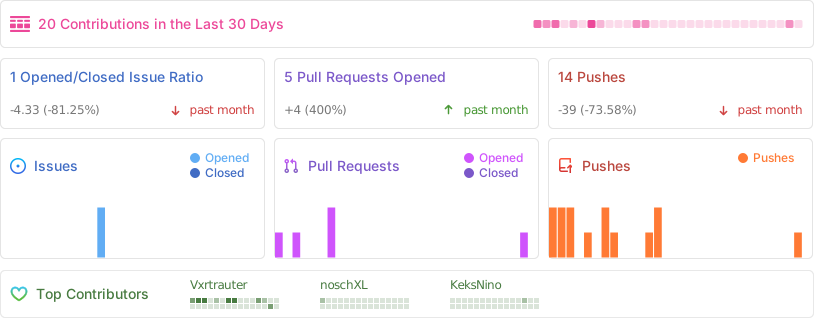
Activity
Star History
Disclaimer: SoftwareManager is intended for legal and ethical use only. Ensure compliance with applicable laws and regulations when using this tool.