mirror of
https://github.com/KeksPirates/SoftwareManager.git
synced 2026-09-30 17:14:25 +02:00
 Vxrtrauter
1a7de70c0b
Vxrtrauter
1a7de70c0b
Add image overlay opacity support and related UI/settings, plus robust config migration and error handling.

Key changes:
- UI: image overlay now uses QGraphicsOpacityEffect, hides when disabled, and updates opacity on state changes (src/interface/dialogs/image.py).
- New NotificationPopup dialog for user alerts (src/interface/dialogs/notificationpopup.py).
- Settings dialog: added Image Opacity control, adjusted labels, persist/rollback behavior on cancel, and include opacity when saving (src/interface/dialogs/settings.py).
- State: added properties for image_opacity and image_enabled with change notifications; renamed image_width setter param for clarity (src/utils/data/state.py).
- Config: switch from config.yml to config.ini, implement one-time migration, typed read/write of values, validation/error handling, automatic backups of corrupted files and user notification (src/utils/config/config.py).
- Settings save: accept and persist image_opacity (src/utils/config/settings.py).
- Startup: initialize QApplication earlier and pass app to run_gui (src/main.py).
- Minor: removed an extra blank line in log handler and small import cleanups.

These changes enable adjustable overlay transparency, improve config reliability, and surface errors to users while preserving/backuping old configs.
SoftwareManager
SoftwareManager is a Python-based GUI tool that simplifies searching and downloading software from various sources, including Rutracker, Uztracker and the official M0nkrus Telegram channel.
Features
- Searching & Downloading Software from various pages
- Network Interface Binding
- Simple UI, Speed Limiting etc.
- No Logins required
Installation
- Download the binary file for your operating system from releases https://github.com/KeksPirates/SoftwareManager/releases
- Run the file
Manual Installation
- Ensure Python 3.x is installed on your system.
- Clone the Repository:
git clone https://github.com/KeksPirates/SoftwareManager.git && cd SoftwareManager - Install Dependencies:
pip install -r requirements.txt - Run main.py:
python main.py
Additional Information
- SoftwareManager is still in Development and most likely contains issues. Please report any bugs you find via the Issues tab. Contributions are also greatly appreciated.
- MacOS Builds haven't been properly tested - We're thankful to receive feedback.
- If you want to host your own server, clone our server repository, enter your cookie for rutracker.org and run server.py. Detailed Instructions on how to get your rutracker cookie are in the README of the server repo.
Python Dependencies
(also included in requirements.txt)
requests (2.32.2)
PySide6 (6.10.1)
beautifulsoup (44.13.5)
darkdetect (0.7.1)
pyinstaller (6.15.0)
PyQtDarkTheme-fork (2.3.4)
aiohttp (3.13.0)
plyer (2.1.0)
psutil (7.1.0)
libtorrent (2.0.11)
libtorrent-windows-dll (0.0.3)
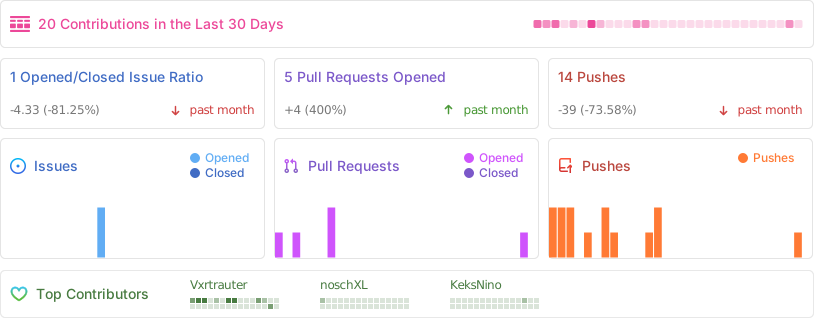
Activity
Star History
Disclaimer: SoftwareManager is intended for legal and ethical use only. Ensure compliance with applicable laws and regulations when using this tool.